


Sense Flip Clock & Weather
4.28.93K Reviews
App Specs
- Version
- 9.14.0
- Updated On
- License
- Free
- Downloads
- 10,000,000+
- Developer
- MACHAPP Software Ltd
- Categories
- Weather
- Platform
- Android, iOS
Screenshots
 Analysis by AppCompare
I like a weather app best when it answers a practical question before I have to open it: do I need a coat, should I leave earlier, or is the afternoon likely to turn wet? Sense Flip Clock & Weather takes that quick check and pairs it with a large clock, so the home screen can be useful at a glance. It is a free weather app from MACHAPP Software Ltd, rated for Everyone, and it has grown into a familiar option, with over ten million installs and an average rating of 4.2 from around 156,000 ratings. Its long history is part of the appeal, though what matters day to day is whether its combination of clock and forecast suits the way you use your phone.
A clock-and-weather home screen with a clear purpose
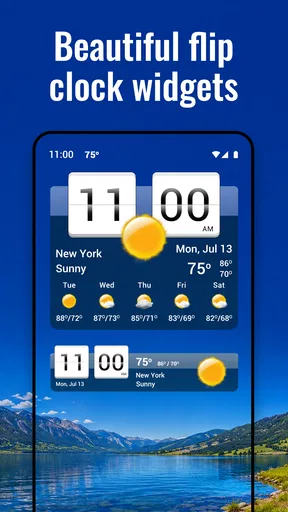
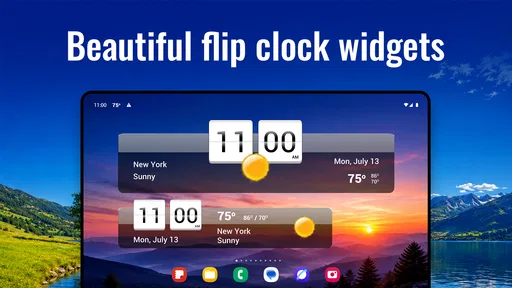
The app’s identity is easy to understand: it brings a flip-style clock and local weather information together in a home-screen widget. That can be more convenient than keeping a separate clock widget and opening another app for the forecast. I would especially consider it if I like seeing the time and a quick weather snapshot without unlocking into several screens or relying on a voice assistant.
The trade-off is that the widget takes up screen space. If I prefer a sparse home screen, or already have a clock built into my phone’s layout, adding another prominent time display may feel redundant. A dedicated weather app may also be a better fit if I mainly want to inspect maps or follow changing conditions in depth. Sense Flip Clock & Weather is most appealing when the combined glanceable display is a feature, not clutter.
How it fits into a real day
Imagine checking your phone while getting ready for work. The clock tells you whether you have time to make coffee, and the weather preview helps you decide whether to carry a raincoat. Later, if plans shift, you can open the app for a closer look rather than trying to remember a forecast you saw hours ago. That is the everyday workflow I find most persuasive: use the widget for a quick decision, then consult the fuller view when the decision has consequences.
A useful habit is to treat a home-screen glance as a prompt, not a complete plan. A broad forecast can help with ordinary choices, but if you are arranging a long drive, outdoor event, or a route where conditions matter, take the time to review the relevant forecast details in the app. This distinction keeps a convenient widget from creating false confidence: easy access is valuable, but it does not make weather inherently predictable.
First Impressions
The moment I installed Sense Flip Clock & Weather, I was struck by its clean and intuitive design. The flip clock aesthetic is a nostalgic nod to the past, yet it fits seamlessly into a modern smartphone interface. The setup was a breeze, and within minutes, my home screen had transformed into a hub of information.
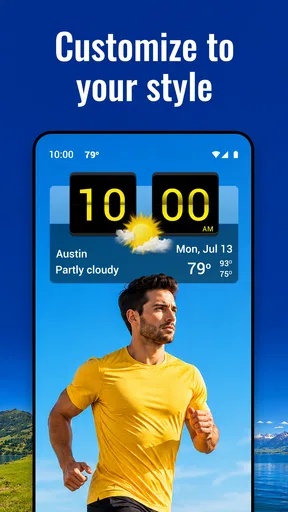
What really caught my eye was the level of customization available. Whether you prefer a minimalist look or something more detailed, the app caters to your personal style. The widget sizes are adjustable, and you can tweak the color schemes to match your phone's theme. I found myself spending a bit more time than I expected playing around with these options, simply because it's fun to see the changes in real-time.
Worth Reading Before You Choose

EA SPORTS FC Mobile 26 Is a Bigger Football Game, but It Takes Time

Flipboard Shows What News Apps Must Do Beyond the Feed

Switching to Android Auto Means Rethinking Your Driving Routine

Google Calendar Makes a Crowded Week Easier to Manage

Ludo King Makes the Most of the Minutes Between Plans

Baby Panda World Brings Quick Play to Modern Phones, but Its Game Library Feels Busy
Making the widget earn its space
Widget customization is more than decoration: it determines whether the information remains readable in the place you actually use it. I would start with a size that leaves enough room for the clock and the weather details I check most often, then change the color scheme to suit the wallpaper rather than choosing a style that looks good only in the app’s settings. A widget that blends into a busy background can be attractive but less useful at a glance.
It is also worth testing the layout through an ordinary week rather than judging it during setup. If I keep having to open the app to answer the same question, I would adjust the widget or simplify what I expect it to do. Conversely, if a compact arrangement makes the forecast hard to read, the larger layout may be worth the home-screen space. The right choice depends on whether I value a clean screen or a more informative snapshot.
Weather Features
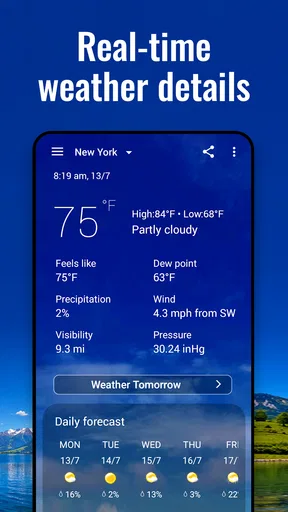
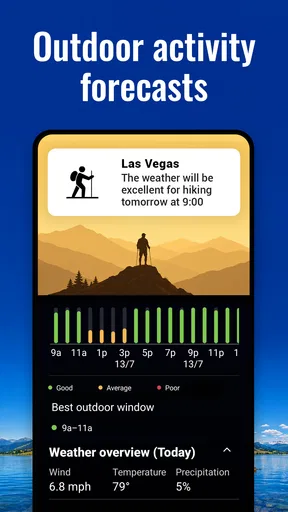
Now, let's talk about the weather info. This isn't just your average weather app. It provides real-time updates and a 7-day forecast that is surprisingly accurate. The data is sourced from multiple providers, ensuring that the information you receive is both current and reliable. I particularly appreciated the hourly forecast feature, which is perfect for planning out the day.
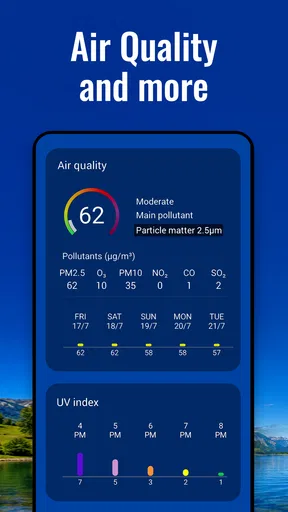
But the weather details don't stop there. The app offers insights into humidity levels, wind speed, UV index, and even sunrise and sunset times. It's like having your personal meteorologist at your fingertips. For someone who loves knowing every detail about the weather, this app is a treasure trove of information.
Reading forecasts with the right level of caution
For everyday planning, hourly information is more useful to me than a single high-and-low figure. If I am deciding when to walk the dog or whether to move an errand earlier, the timing of conditions can matter as much as the day’s general outlook. Humidity and wind can also change how a temperature feels, while UV information is relevant when I expect to spend time outside. These details give the forecast practical context rather than turning it into a list of numbers.
There is a trade-off in having multiple weather providers involved: extra sources can be helpful, but they do not make every forecast certain. When the forecast is important, I would check it again closer to the time and pay attention to the hourly view instead of treating a week-ahead prediction as fixed. That is sensible for any weather app, and it is a particularly useful way to get value from one that puts a broad overview within easy reach.
If your local conditions change quickly, make a habit of refreshing your understanding before leaving rather than relying only on a widget you last noticed in the morning. If you mostly want a general sense of the day, the home-screen view is likely enough. If you need detailed situational awareness for work or outdoor plans, a specialist forecasting tool may complement it better than expecting one app to cover every need.
Additional Features
Beyond the clock and weather, the app has a few extra features that are worth mentioning. The world clock option allows you to keep track of time in different time zones, which is handy for those of us with friends or family abroad. There's even a moon phase calendar for anyone interested in lunar cycles.
Those extras are most useful when they solve a small recurring problem. For example, I can check another time zone before calling a relative, then use the local clock as my reference without switching between separate tools. The moon phase calendar is more niche: it adds interest for people who follow lunar cycles, but it is unlikely to be the reason most people choose a daily weather widget. I see these as convenient additions, not substitutes for dedicated tools when precision or deeper research matters.
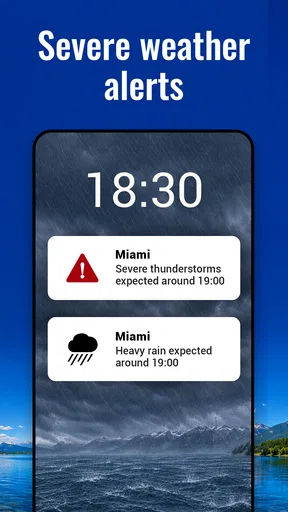
Notifications are another strong suit of this app. You can set up alerts for severe weather changes, ensuring you're never caught off guard by an unexpected storm. These alerts can be customized to your liking, so you're only notified about the things that matter most to you.
Keeping alerts useful rather than noisy
Weather alerts work best when they are selective. I would enable the warnings that could genuinely change what I do, then avoid turning every possible update into a reason to check the phone. Too many notifications make it easy to ignore the one that matters; a restrained setup makes an alert feel like a useful interruption rather than background noise. If I am planning an outdoor day, I would still check the forecast directly instead of assuming an alert system will answer every planning question.
That is an important distinction for anyone comparing this with a basic forecast app. A simple app may be enough if all you want is a quick temperature check. Here, the appeal is the combination of a configurable clock display, weather details, and optional alerts. The extra controls are worthwhile if you use them, but there is no benefit in enabling features just because they are available.
Where it sits among weather apps
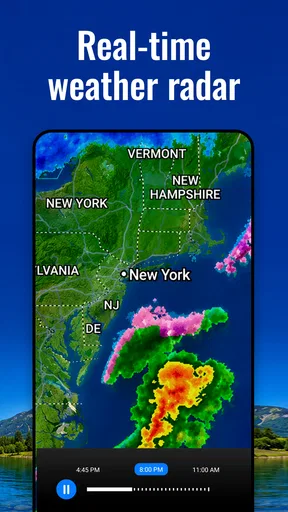
Compared with a phone’s built-in weather view, this app puts more emphasis on the flip-clock presentation and on keeping information visible in a widget. That can make it a better fit for someone who wants time and weather together, especially if they enjoy adjusting the look of the home screen. In contrast, a minimalist built-in forecast may be quicker for someone who wants no extra setup, while a radar-focused service may be preferable for tracking storms visually.
I would not choose it solely because I expect one weather app to be best for every purpose. Its strengths are convenience and a distinctive clock-led layout; its limits are the same ones that come with relying on a compact display for complex decisions. If I need a detailed map or a specialized view, I would use a tool designed around that job. For the routine question of what the day may feel like, the blend of widget and forecast is a more natural fit.
User Experience
One of the aspects I appreciate most about Sense Flip Clock & Weather is its user-friendly interface. Everything feels intuitive, from setting up the widget to navigating through the app's various features. There's no steep learning curve, which means you can start benefiting from the app right away.
Performance-wise, the app runs smoothly without any noticeable lag. It doesn't drain the battery, which is a crucial factor for any app residing on the home screen. Plus, it doesn't bombard you with ads, allowing for a distraction-free experience.
Who will get the most from it
I would recommend trying it if you enjoy a visible clock, check the weather several times a day, or want to personalize your home screen without giving up practical information. It also makes sense for someone who regularly coordinates across time zones and would use the world clock alongside local conditions. People who only check the weather occasionally may find a built-in app simpler, and anyone who dislikes widgets may not get much from its central idea.
The app is free to download, with in-app purchases priced from $4.99 to $15.99 per item. I would begin with the free experience and work out whether the clock-and-weather setup becomes part of my routine before spending anything. Optional purchases make more sense when a specific added benefit solves a need, rather than as an automatic step after installation.
Version history, continuity, and what to watch
Sense Flip Clock & Weather has been available since December 28, 2011, and its current version is 9.01.0. That span suggests a product that has continued to be maintained, but I would not infer a particular feature change from the version number alone. What I can judge as a prospective user is the present-day combination: a flip clock, a customizable widget, and weather information in one place.
For existing users, the main reason to revisit the app is whether its current widget and forecast workflow still matches their habits. If the clock remains readable, the chosen details are useful, and alerts are appropriately selective, there may be little need to alter a setup that already works. If the home screen feels crowded or notifications interrupt too often, simplifying the layout and alert choices is a more practical first step than adding more information.
When considering any future change, I would look for clear improvements to the parts I actually use: the widget’s readability, how easily I can get from a quick glance to a useful forecast, and whether the settings remain straightforward. Those are sensible things to watch, not promises about what a later release will include. The app already has a clear role; its value depends on continuing to make that role convenient.
Final Thoughts
In a world where the weather can make or break your day, having a reliable app like Sense Flip Clock & Weather is invaluable. Its combination of style, functionality, and detailed weather information makes it stand out from the crowd. Whether you're a weather geek or just someone who wants to know if they need an umbrella, this app has got you covered.
I wholeheartedly recommend giving it a try. It's free to download, with optional in-app purchases that enhance the experience even further. So go ahead, check it out, and let me know what you think!
Pros
- User-friendly interface for easy navigation.
- Customizable themes enhance personalization.
- Accurate weather updates in real-time.
- Low battery consumption for prolonged use.
- Wide range of widget sizes available.
Cons
- Ads can be intrusive for some users.
- Limited free features without upgrade.
- Occasional lag on older devices.
- Requires internet for weather updates.
- No offline mode for clock functionality.
FAQs for Sense Flip Clock & Weather
What features does Sense Flip Clock & Weather offer?
Sense Flip Clock & Weather provides a beautifully designed flip clock and a detailed weather forecast. Users can access real-time weather updates, weekly forecasts, and customizable widgets. The app also supports multiple locations, allowing you to check weather conditions anywhere in the world. Additionally, it offers a sleek interface with various themes to personalize your experience.
Is Sense Flip Clock & Weather free to use?
Yes, Sense Flip Clock & Weather is free to download and use. However, it offers in-app purchases that unlock additional features, such as more customization options and an ad-free experience. These purchases are optional and designed to enhance the app’s functionality, providing users with a more tailored experience.
How accurate is the weather forecast in Sense Flip Clock & Weather?
Sense Flip Clock & Weather uses reliable weather data sources to provide accurate forecasts. It updates regularly to ensure users receive the most current information. While no weather app can guarantee 100% accuracy, users generally find the forecasts to be precise and helpful for planning their day.
Can I customize the widget appearance in Sense Flip Clock & Weather?
Absolutely! Sense Flip Clock & Weather offers a range of customization options for its widgets. Users can choose from different themes, colors, and widget sizes to match their home screen aesthetic. This flexibility allows you to personalize your clock and weather display according to your preferences.
Does Sense Flip Clock & Weather drain battery life?
Sense Flip Clock & Weather is optimized to minimize battery usage. It runs efficiently in the background, providing updates without significantly impacting your device’s battery life. However, enabling frequent updates or using many features simultaneously may increase battery consumption slightly, as with any app offering real-time information.


